This post is part of a series illustrating how to automate the process of deploying an AD Lab. This article provides architectural detail about the AD Lab. The lab is comprised of a Hyper-V NAT switch, a Windows AD domain controller, and a Windows desktop; and optionally can contain users, computers, groups, and delegations that represent a simple AD deployment.
Diagram
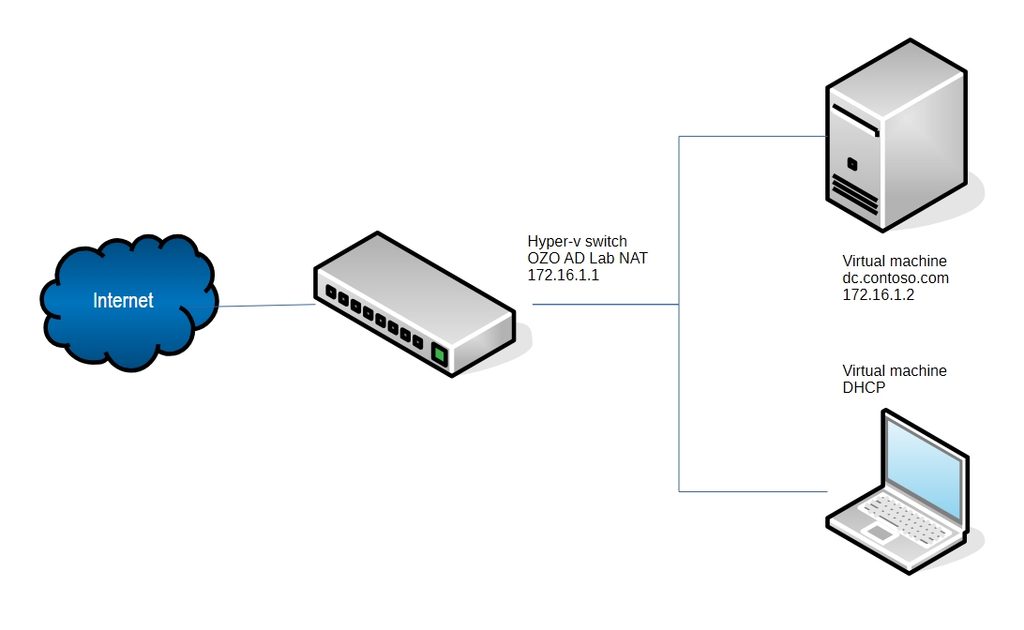
Network and Addressing
- The lab uses 172.16.1.0/24.
- The Hyper-V switch, OZO AD Lab NAT provides a pathway to the internet through gateway IP 172.16.1.1.
- The contoso.com AD DC provides DHCP addresses from 172.16.1.101 to 172.16.1.254.
Time
All endpoints are configured for Universal Coordinated Time (UTC).
Endpoints
| Name | Operating System | Services | vCPUs | Memory | Disk | Network | Interface | IP |
|---|---|---|---|---|---|---|---|---|
| dc.contoso.com | Windows Server 2025 Evaluation Edition | ADDS, DFS, DHCP, DNS, and SMB | 1 | 2GB | 128GB | OZO AD Lab NAT | Ethernet | 172.16.1.2 |
| [auto-generated hostname].contoso.com | Windows 11 Enterprise Evaluation Edition | Graphical desktop | 2 | 4GB | 128GB | OZO AD Lab NAT | Ethernet | DHCP |
Domain Users
| Last | First | Division | Title | EmployeeID | Account Name | Password |
|---|---|---|---|---|---|---|
| Administrator | Domain | IT | Domain Administrator | NA | Administrator | OZOADL@b$ecurePassw0rd |
| Santos | Misty | Administration | CEO | 196770 | msantos | s5i|l7MoG*27M|L; |
| Kaplan | Ginger | Administration | COO | 313823 | gkaplan | juLN&vPKToD$7;3B |
| Walter | Becky | Administration | CIO | 623943 | bwalter | a>[y4*Lajs2bWF4u |
| Sawyer | Naomi | Development | Development Director | 545423 | nsawyer | l>-Wr5L=xR#wvX^M |
| Burton | Joni | Development | Development Assistant | 186651 | jburton | G7xU3jb*9S}mi1g. |
| Casey | Ross | Development | Development IT Specialist | 430898 | rcasey | EDK_ST?%5Ea4GZs9 |
| Lynch | Marlene | Finance | Finance Director | 534705 | mlynch | &r3%*5K+.O96SfoD |
| Weber | Jesse | Finance | Finance Assistant | 637667 | jweber | pb5.OzQ5=3DF|G^Edw |
| Gillespie | Darla | Finance | Finance IT Specialist | 723960 | dgillespie | CXw=3D.)7rt*=3DJEr8| |
| Velasquez | Jodie | Human Resources | Human Resources Director | 703549 | jvelasquez | o0Vv;^fvHpzs!ObS |
| Kane | Frankie | Human Resources | Human Resources Assistant | 857530 | fkane | _|kT!vEOi;MGpv8P |
| Case | Eduardo | Human Resources | Human Resources IT Specialist | 109555 | ecase | acBtK-0O^6#xgl5V |
| Martinez | Mae | IT | IT Director | 439938 | mmartinez | y;UA36NEE[Xr&1!_ |
| Hardy | Phillip | IT | IT Server Engineer | 372533 | phardy | !ePp9_#Q4x4]CJyC |
| Richards | Daryl | IT | IT Workstation Engineer | 232908 | drichards | b)q0iC5!:Bu@_[F$ |
| Durham | Dana | Marketing | Marketing Director | 280337 | ddurham | Dt]}RsEy$KV&yYoI |
| Daly | Grace | Marketing | Marketing Assistant | 637495 | gdaly | [7?W&;JbV(ALwki^ |
| Norton | Dennis | Marketing | Marketing IT Specialist | 124174 | dnorton | zRK.A{Ry$5srQrv[ |
| Taylor | Casey | Operations | Operations Director | 585266 | ctaylor | 0hZWYe:@Mna8xofF |
| Thomas | Joel | Operations | Operations Assistant | 299262 | jthomas | 1aq$OV^qe@sB4d.t |
| Carver | Patsy | Operations | Operations IT Specialist | 352832 | pcarver | t+:.@&l{WF{f45PC |
Local Users
| Endpoint | Account Name | Password |
|---|---|---|
| OZO AD Lab Windows Client | Administrator | OZOADL@b$ecurePassw0rd |
Part I – Introduction
- Introduction
- Architecture